
An AutoEntry alternative where line items cost nothing extra.
Daybook Capture reads every line of your clients’ receipts and purchase invoices, till receipts included, and writes the import file for Sage 50, Sage Accounting, Xero, QuickBooks Online and more, or Excel. Each document counts once, whatever is on it.
Free for 14 days, up to 50 documents. No card needed.
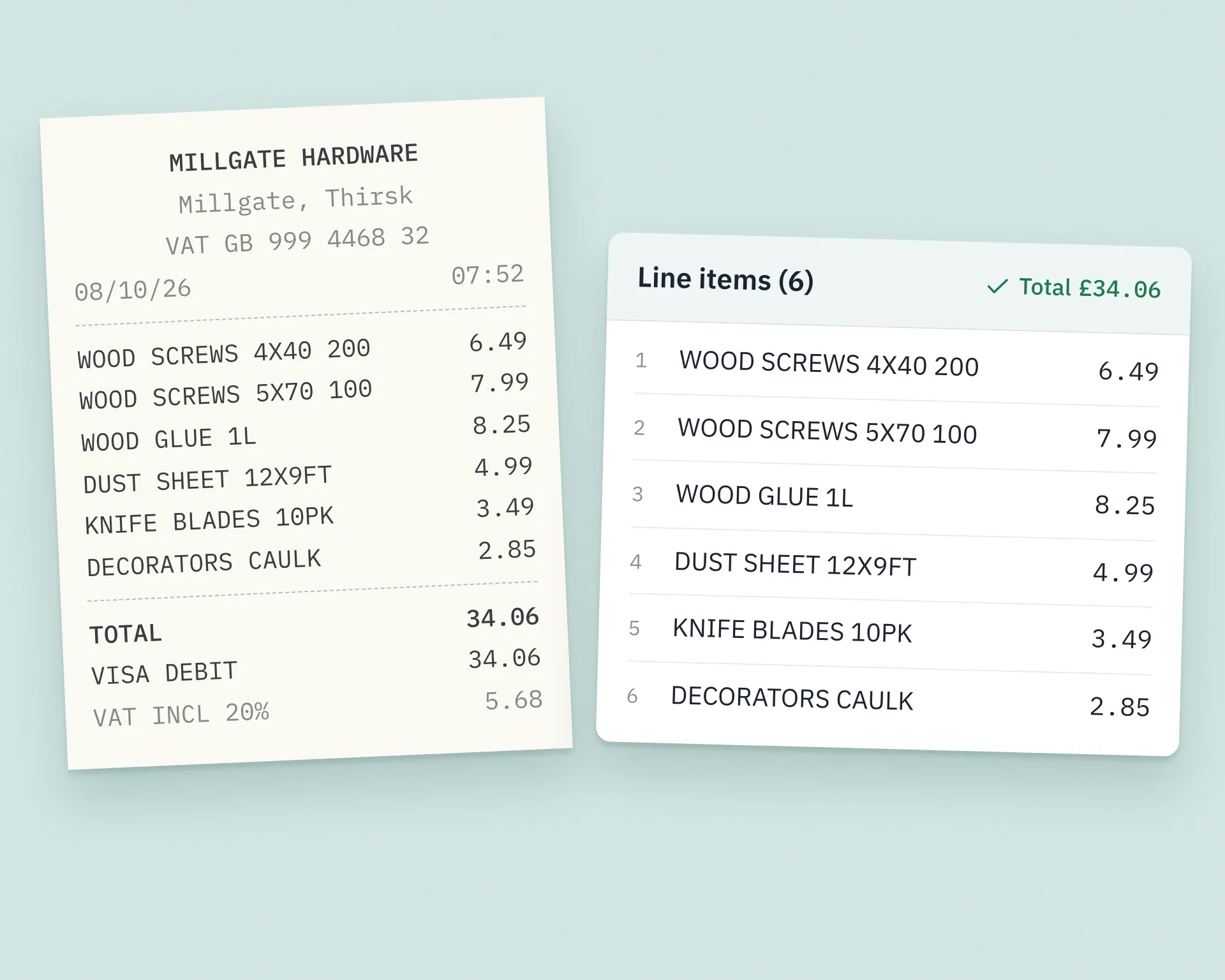
AutoEntry and Daybook Capture, side by side.
What AutoEntry’s own pages and terms say, beside what Daybook does. Read on ; the small numbers point to the sources at the end of the page.
| Subject | AutoEntry | Daybook Capture |
|---|---|---|
| How the price is set | AutoEntryA monthly allowance of credits. An invoice or receipt uses one credit; an invoice read with its line items, two.1 | Daybook CaptureAn allowance of documents: 150, 500 or 1,500 a month, or a year’s in one pool on a yearly plan. Each counts once, whatever is read from it. |
| Line items | AutoEntryOnly the total and tax summary, unless line items are asked for, at one extra credit per invoice. Not read from standard shop or till receipts.2,3 | Daybook CaptureRead from every document that lists them, till receipts included, and checked against the total. No extra charge. |
| Handwritten receipts | AutoEntryHandwritten invoices are usually rejected. A scan with pen marks or handwriting on it is likely to be rejected too.4 | Daybook CaptureRead, with a note to check the handwritten amounts against the original. |
| Bank statements | AutoEntry3 credits a page, against 1 for an invoice.1 | Daybook CaptureRead from the PDF, a scan or photos, each page with transactions counted as one document, and every balance checked. Exported as the bank file for VT Transaction+, Xero, QuickBooks Online, FreeAgent, QuickFile or Sage 50, or as CSV or Excel. The bank’s own CSV or Excel file is taken as it is and not counted. |
| Several receipts on one page | AutoEntryOne invoice or receipt per page or image: several documents on the same page cannot be told apart.5 | Daybook CaptureSplit into one purchase for each receipt, up to 20 in a file. |
| Going over the plan | AutoEntryAllowed up to 200% of the monthly credits, added to the next bill with a 10% extra charge.6 | Daybook CaptureNothing extra is charged. Documents past the plan wait for the next period, or are read at once on a bigger plan. |
| Cancelling | AutoEntryAny time, up to 24 hours before the monthly renewal.1 | Daybook CaptureAny time. The plan runs to the end of the period paid for. |
| Refunds | AutoEntrySage’s terms: payment obligations are non-cancellable and non-refundable.7 | Daybook CaptureWithin 14 days of paying for a plan or renewing it yearly, for the part not used (refund policy). |
Which plan would you be on? Set the documents your clients send a month and the plan finder gives the plan and its price.
Credits or documents.
AutoEntry’s pricing is in credits, and what a document uses depends on what is read from it: one credit for an invoice or receipt, two for an invoice read with its lines.1 In Daybook, every document counts once, lines and all.
Each invoice you want line by line uses two AutoEntry credits and one Daybook document. Try your own month in our plan finder and in the credit calculator on AutoEntry’s pricing page.1 Both show prices before VAT.
Every line, till receipts included.
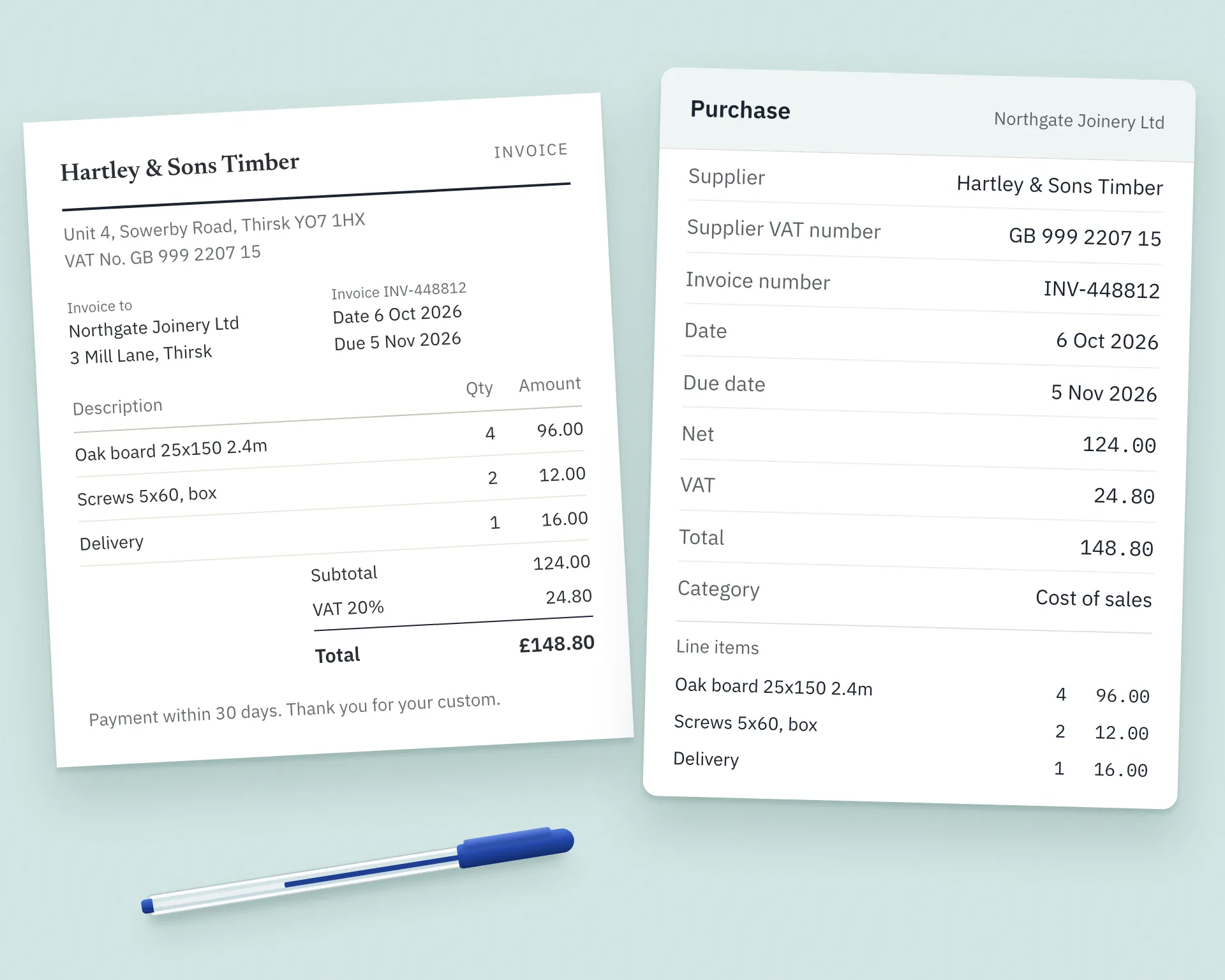
Daybook reads every line of a supplier’s invoice or a shop’s till receipt, with its amount, and the quantity where it is printed. The lines are checked against the total and can be corrected before approval.
AutoEntry reads the total and the tax summary unless line items are asked for, and says it cannot read them from standard shop or till receipts: those lines are added by hand.2,3
Exports carry one row per document, or one line per VAT rate in most files for accounting software (VT Transaction+ takes one row a document). Sage 50 and Sage Accounting files find each supplier by its account reference, kept on Daybook’s Suppliers tab or imported from a CSV.
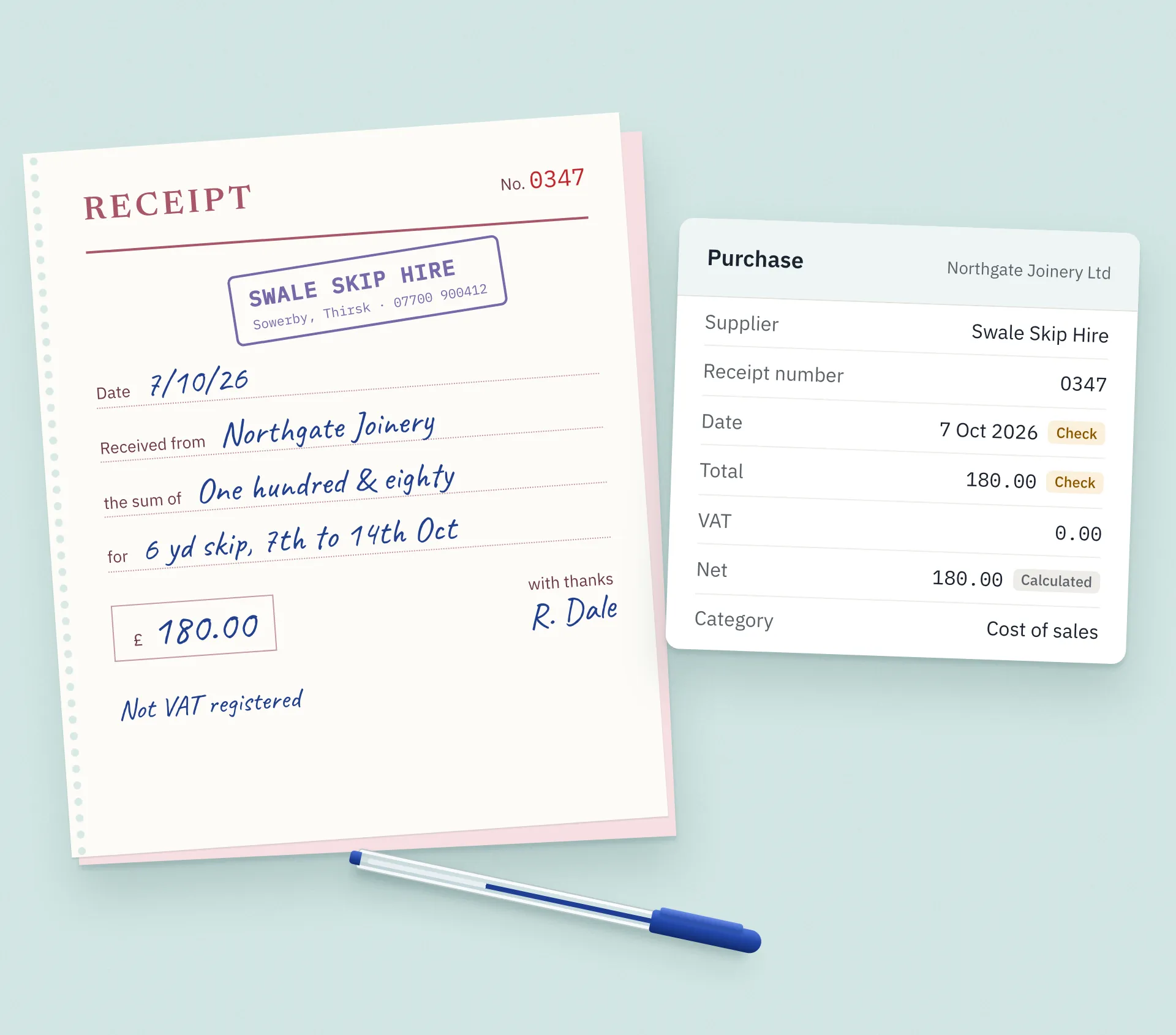
Receipts written by hand.
Skip hire, a market stall, a window cleaner: some suppliers still write receipts by hand in a duplicate book. Daybook reads them, with a note to check the handwritten amounts against the original.
AutoEntry’s help says it will usually reject a handwritten invoice, and that a scan with pen marks or handwriting on it is likely to be rejected.4
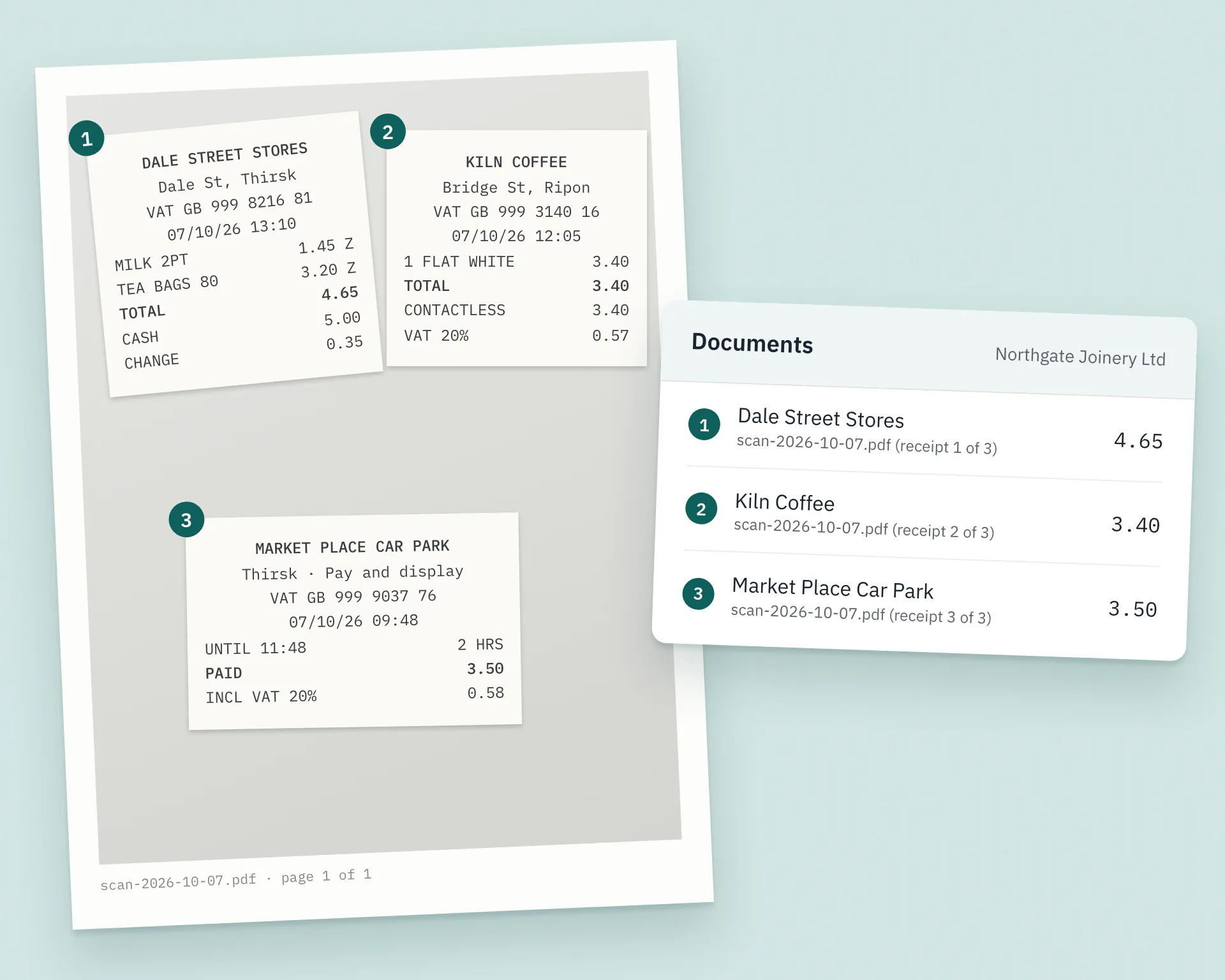
A scan of several receipts.
Clients who keep receipts in an envelope often have them scanned a few to a page. Daybook splits the page into one purchase for each receipt, up to 20 in a file, each kept with the scan it came from.
AutoEntry asks for one invoice or receipt per page or image, as it cannot tell several documents on the same page apart.5
Moving over from AutoEntry.
AutoEntry can be cancelled at any time up to 24 hours before its monthly renewal. Credits left can still be used for 30 days, and the data stays available for 13 months, so there is time to finish a month and download what you want to keep.1,6
In Daybook, import your clients, chart of accounts and suppliers from CSV files, then invite each client or give them their own Daybook email address. Every row is shown before anything is saved.
Questions about moving from AutoEntry.
Is Daybook cheaper than AutoEntry?
It depends on what your clients send. AutoEntry’s price follows credits, and an invoice with its lines uses two; Daybook’s follows documents, each counted once. Put your own month into our plan finder and into the credit calculator on AutoEntry’s pricing page.1
Do both have unlimited users and clients?
Yes. AutoEntry’s plans include unlimited users and clients,1 and so do Daybook’s.
Can I try Daybook while my AutoEntry plan runs?
Yes. The trial is free for 14 days and up to 50 documents, with no card. Upload a client’s month you have already done and compare what Daybook reads with your books.
Do my clients need to install anything?
No. They upload from the web browser on their phone or computer, or email receipts to their own Daybook address.
Who wrote this comparison?
We did, so it is not independent. Every statement about AutoEntry comes from AutoEntry’s own pages, listed below with the day we read them. If something has changed, write to hello@daybookcapture.co.uk and we will correct it. AutoEntry is a trade mark of its owner; Daybook Capture is not connected with AutoEntry or Sage.
Sources
Every fact on this page was checked against these on 27 October 2026.
- AutoEntry pricing (opens in a new tab), AutoEntry.
- Upload documents to AutoEntry (opens in a new tab), AutoEntry Help Center.
- Line Item Extraction (opens in a new tab), AutoEntry Help Center, 8 May 2026.
- Pen marks and handwriting on documents (opens in a new tab), AutoEntry Help Center.
- Upload format (opens in a new tab), AutoEntry Help Center, 6 October 2026.
- Manage AutoEntry credits (opens in a new tab), AutoEntry Help Center, 14 October 2026.
- Sage Cloud Services Terms of Service (opens in a new tab), AutoEntry.
Try it on a month you know.
Upload a month of one client’s receipts that you have already done, and compare what Daybook reads with what is in the books.
Free for 14 days, up to 50 documents. No card needed.