
A Hubdoc alternative that reads every line and every VAT rate.
Daybook Capture reads your clients’ receipts and purchase invoices line by line, with the VAT at each rate, and makes the bills file Xero imports. Here it is beside Hubdoc and Xero Smart Document Capture.
Free for 14 days, up to 50 documents. No card needed.
Hubdoc, Xero Smart Document Capture and Daybook Capture, side by side.
What Hubdoc’s and Xero’s own pages say, beside what Daybook does. Read on ; the small numbers point to the sources at the end of the page.
| Subject | Hubdoc | Xero Smart Document Capture | Daybook Capture |
|---|---|---|---|
| How it is paid for | HubdocIncluded in Xero’s plans while connected to the Xero subscription. Otherwise a monthly fee for each client, with unlimited documents; the practice’s own account is free.1,2 | Xero Smart Document CaptureIncluded in Xero’s Ignite, Grow, Comprehensive and Ultimate plans.1 | Daybook CapturePaid for on its own: a monthly price by the documents read, 150, 500 or 1,500 a month, whatever the number of clients. |
| What is read | HubdocDate, supplier and total, and the due date and invoice number when shown.3 | Xero Smart Document CaptureReceipts and invoices are read, with line items where needed and the local tax rate.4,5 | Daybook CaptureSupplier and its VAT number, date, number, every line, the VAT at each rate and the totals, with a note on anything to check. |
| Line items | HubdocNot read automatically. Xero said in July 2025 that no further work on extracting line item details in Hubdoc is planned.6,7 | Xero Smart Document CaptureRead where needed.4 | Daybook CaptureRead from every document that lists them, and checked against the total. |
| VAT | HubdocOne tax rate chosen for the document, or the VAT amount read. Its help names grocery bills, with some items taxed and others not, as a case where one rate gives the wrong VAT, to be put right by hand.6 | Xero Smart Document CaptureThe local tax rate is read from the document.5 | Daybook CaptureThe VAT at each rate, from the receipt’s VAT summary, checked against the VAT total. The Xero file has a line for each rate. |
| The supplier’s VAT number | HubdocNot among the fields Hubdoc reads.3 | Xero Smart Document CaptureReading and checking UK tax numbers was announced in September 2026 as coming in the following months.5 | Daybook CaptureRead, and its check digits checked. The client’s own number printed in its place is flagged. |
| Bank statements | HubdocPDF statements to CSV in the US and Canada only, with no work planned for other regions.9 | Xero Smart Document CaptureNot offered: Xero’s reply on converting statements points to Smart Document Capture, with no work planned.9 | Daybook CaptureRead from the PDF, a scan or photos, each page with transactions counted as one document, and every balance checked. Exported as the bank file for VT Transaction+, Xero, QuickBooks Online, FreeAgent, QuickFile or Sage 50, or as CSV or Excel. The bank’s own CSV or Excel file is taken as it is and not counted. |
| A file of several documents | HubdocA PDF can be split into one document per page.8 | Xero Smart Document CaptureA file is not split once uploaded; on a phone, several photos can be uploaded as separate documents.10 | Daybook CaptureEach receipt becomes its own purchase, also when several share a page, up to 20. |
Which plan would you be on? Set the documents your clients send a month and the plan finder gives the plan and its price.
Included with Xero, or paid by the document.
Hubdoc comes with Xero’s plans, and Smart Document Capture with Ignite, Grow, Comprehensive and Ultimate, so there is nothing more to pay for them.1 Daybook is paid for on its own, by the documents read each month, with any number of clients.
It is worth paying for when clients send mixed paperwork: supermarket receipts with two VAT rates, invoices you want line by line, an envelope of receipts scanned a few to a page. Try it on a month you have already done and compare.
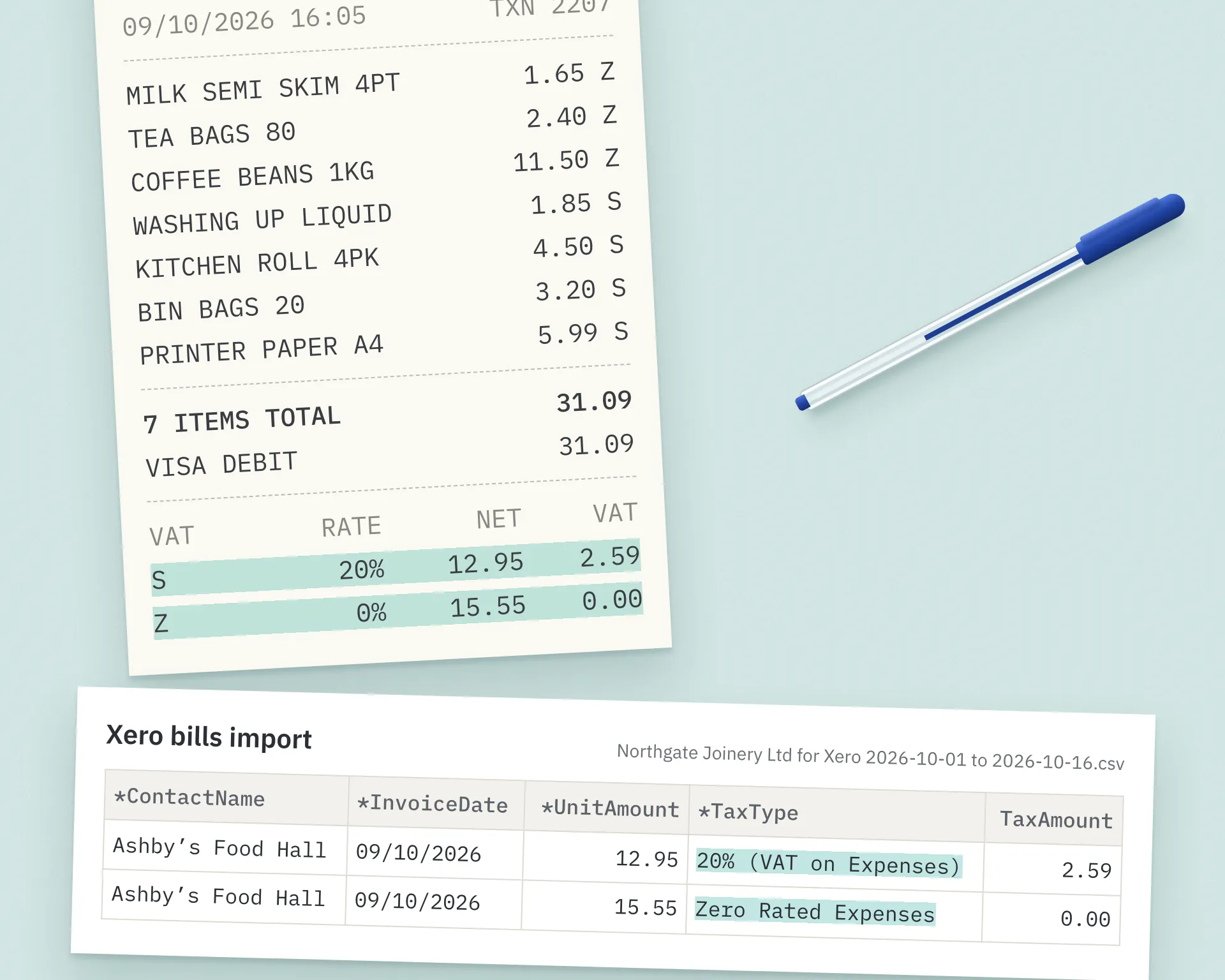
Two VAT rates on one receipt.
A supermarket shop often has zero rated food and standard rated household goods on the same receipt. Daybook reads the VAT at each rate from the receipt’s VAT summary and checks each one against its net amount and the VAT total.
The Xero bills file then has one line for each rate, with Xero’s own VAT rate names. If the rates on a receipt do not add up to its total, the rate is left empty for you to choose. Hubdoc’s help gives grocery bills as a case where one rate for the document gives the wrong VAT.6
Line items on every document.
Daybook reads every line of a receipt or invoice, with its amount, and the quantity where it is printed, and checks the lines against the total. A document with line items counts once, like any other.
Hubdoc reads the date, supplier and total, and leaves the lines to be typed in.6
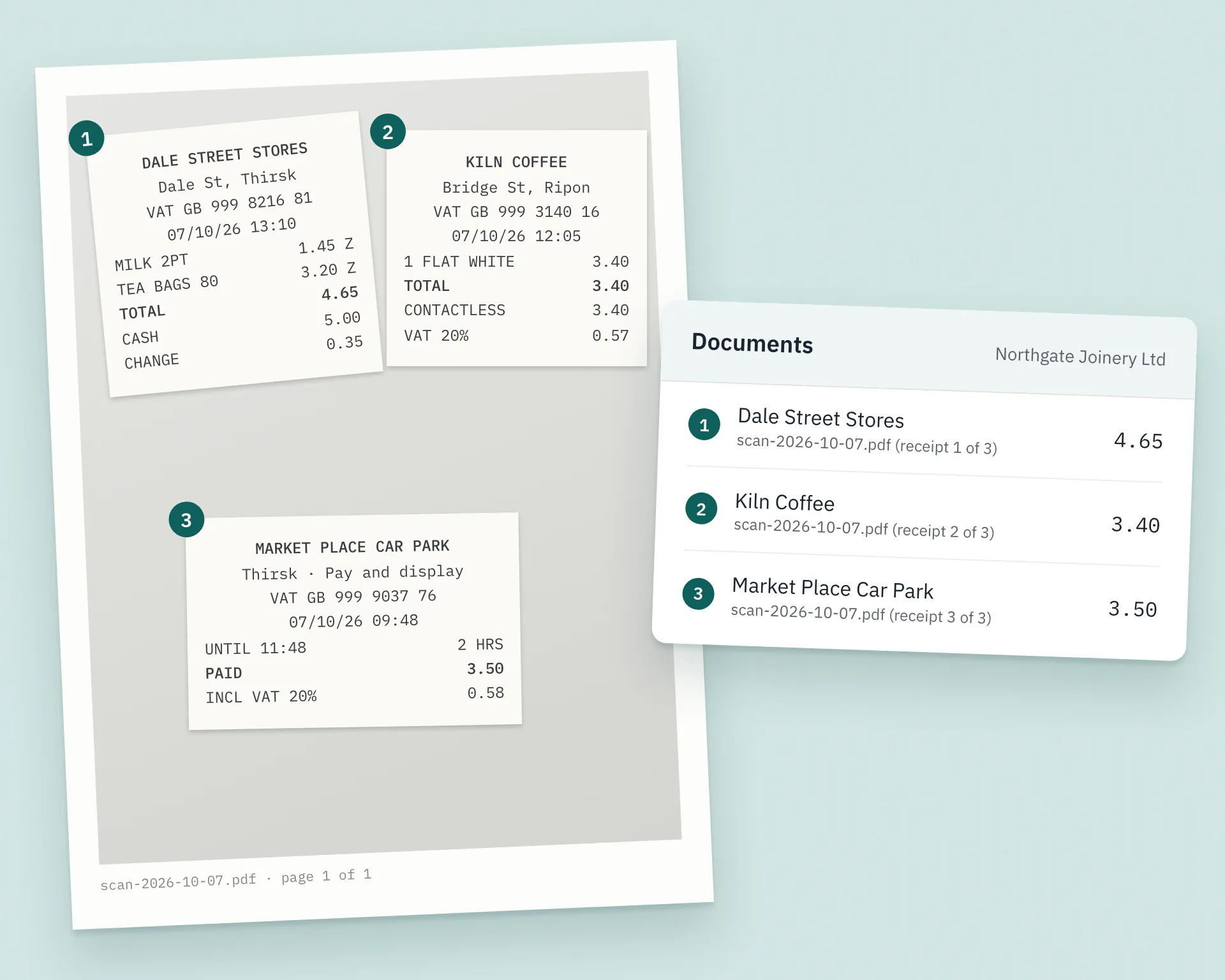
A scan of several receipts.
Clients who keep receipts in an envelope often have them scanned a few to a page. Daybook splits the page into one purchase for each receipt, up to 20 in a file, each kept with the scan it came from.
Hubdoc splits a PDF by page, one document per page.8 Xero does not split a file once it is uploaded.10
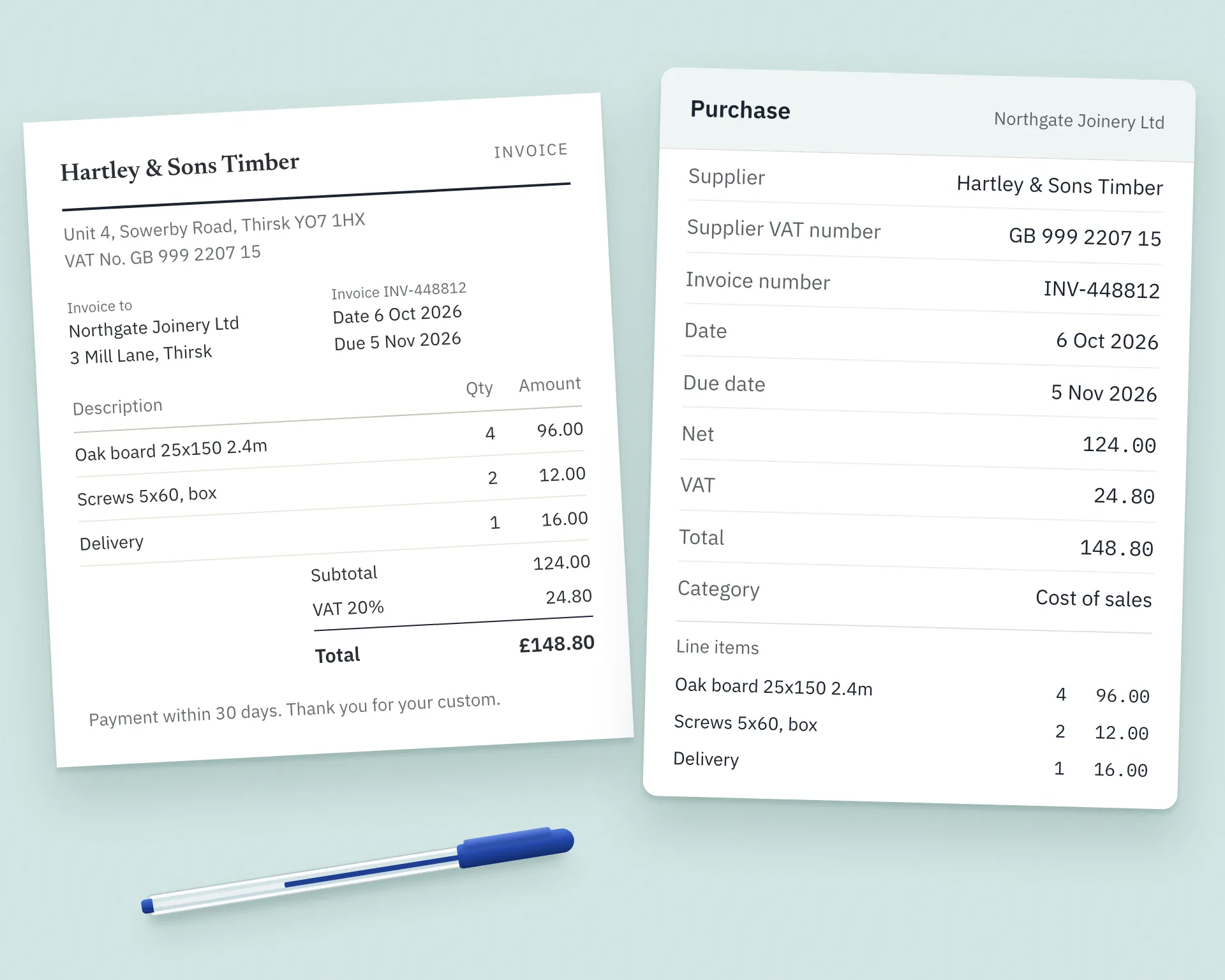
The supplier’s VAT number, checked.
Daybook reads the supplier’s VAT number and checks its check digits, so a digit misread or mistyped is usually caught before approval. A receipt that shows your client’s own number where the supplier’s should be is flagged.
To check a whole supplier list, use the free VAT number format check.
Importing the bills into Xero.
Approve the week’s purchases and export them as Xero’s bills import file, with your account codes and a line for each VAT rate. In Xero the bills arrive as drafts to approve.
The originals download as one ZIP, each file named by date, supplier and total, so each one can be matched to its bill.
Questions from Xero users.
Why pay for Daybook when Hubdoc comes with Xero?
If your clients send simple receipts with one VAT rate, Hubdoc may be all you need.1 Daybook is worth paying for when clients send mixed paperwork: supermarket receipts with two VAT rates, invoices you want line by line, or receipts scanned a few to a page. Try it free on a month you have already done.
Can I use Daybook with Xero?
Yes. Approved purchases are exported as Xero’s bills import file, which you import in Xero from Purchases, Bills, New bill, Import from CSV. The bills arrive as drafts to approve, and suppliers not yet in Xero are added. Daybook does not need a login to your Xero organisation.
Does it work with QuickBooks Online and other software?
Yes. There are import files for QuickBooks Online, Sage 50, Sage Accounting, FreeAgent, VT Transaction+ and QuickFile, and CSV or Excel files with the columns you choose for any other software (exports).
Do my clients need to install anything?
No. They upload from the web browser on their phone or computer, or email receipts to their own Daybook address.
Can I try it on documents already in Xero?
Yes. The trial is free for 14 days and up to 50 documents, with no card. Upload a client’s month you have already entered and compare what Daybook reads with your bills.
Who wrote this comparison?
We did, so it is not independent. Every statement about Hubdoc and Xero comes from their own pages, listed below with the day we read them. If something has changed, write to hello@daybookcapture.co.uk and we will correct it. Hubdoc and Xero are trade marks of their owners; Daybook Capture is not connected with Hubdoc or Xero.
Sources
Every fact on this page was checked against these on 27 October 2026.
- Pricing plans (opens in a new tab), Xero UK.
- Hubdoc for accountants and bookkeepers (opens in a new tab), Hubdoc.
- About document fields and types (opens in a new tab), Hubdoc Helpdesk, 26 June 2023.
- Smart Document Capture (opens in a new tab), Xero UK.
- Files is now called Documents: a new name for where Smart Document Capture lives (opens in a new tab), Xero Blog, 18 September 2026.
- About data extraction (opens in a new tab), Hubdoc Helpdesk, 6 June 2024.
- Hubdoc - Extract all line item details including inventory items (opens in a new tab), Xero Product Ideas, Xero’s reply of July 2025.
- About getting documents into Hubdoc (opens in a new tab), Hubdoc Helpdesk, 6 June 2024.
- Hubdoc: convert bank statement to CSV file (product idea) (opens in a new tab), Xero Product Ideas, Xero’s reply of 26 June 2026.
- Documents - Ability to split PDF to separate multi-page documents (opens in a new tab), Xero Product Ideas, Xero’s reply of 18 September 2026.
Try it on a month already in Xero.
Upload a month of one client’s receipts that you have already entered, and compare what Daybook reads with the bills in Xero.
Free for 14 days, up to 50 documents. No card needed.