
Receipts from clients on WhatsApp.
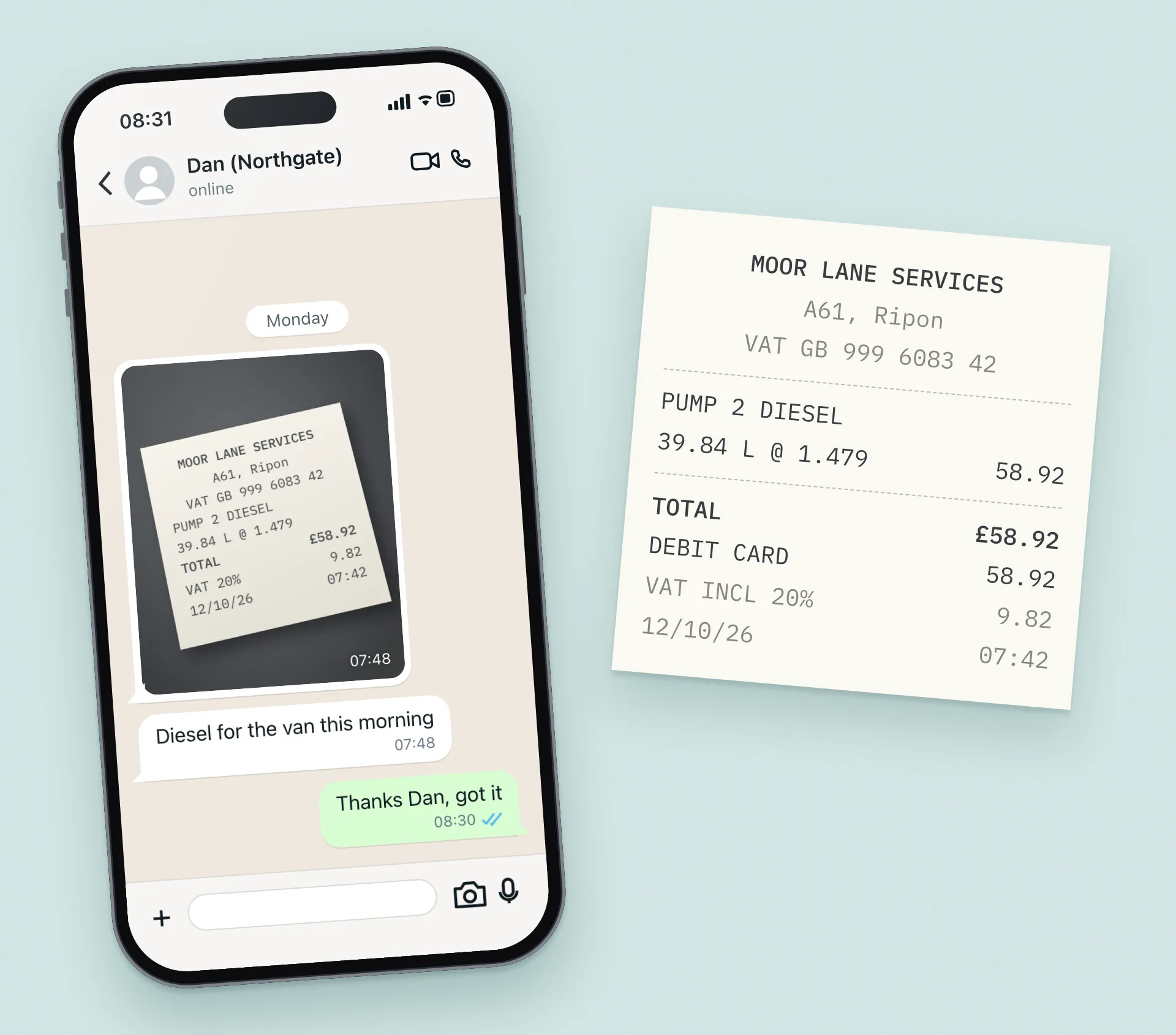
When clients send receipts on WhatsApp, a few settings on their phone decide how sharp the photo is and whether you can save it. Here is how to keep the photos sharp, get them out of the chat and check they show what HMRC expects, with a receipt request email to copy.
Last updated
In short
- WhatsApp usually compresses photos when they are sent. Ask clients to choose HD quality, or to make it their default.
- Photos sent as view once cannot be saved, and in a chat with disappearing messages on they are not saved to the phone. Ask for receipts in an ordinary chat.
- Save each photo out of the chat with the client’s records: VAT records are kept for at least 6 years.
- A photo can stand in for the paper when it is kept and shows all the detail required for VAT, sharp enough to read.
- Copy the receipt request email below to tell clients once what to send, by when and how.
Daybook reads each saved photo, or one the client uploads or forwards to their own Daybook address, and marks a second copy of the same receipt as a possible duplicate. How clients send receipts in
Contents
What WhatsApp does to a receipt photo
When a client sends a receipt on WhatsApp as a photo, WhatsApp’s own help says the quality may be lower than the original, because media files are usually compressed when they are shared.1
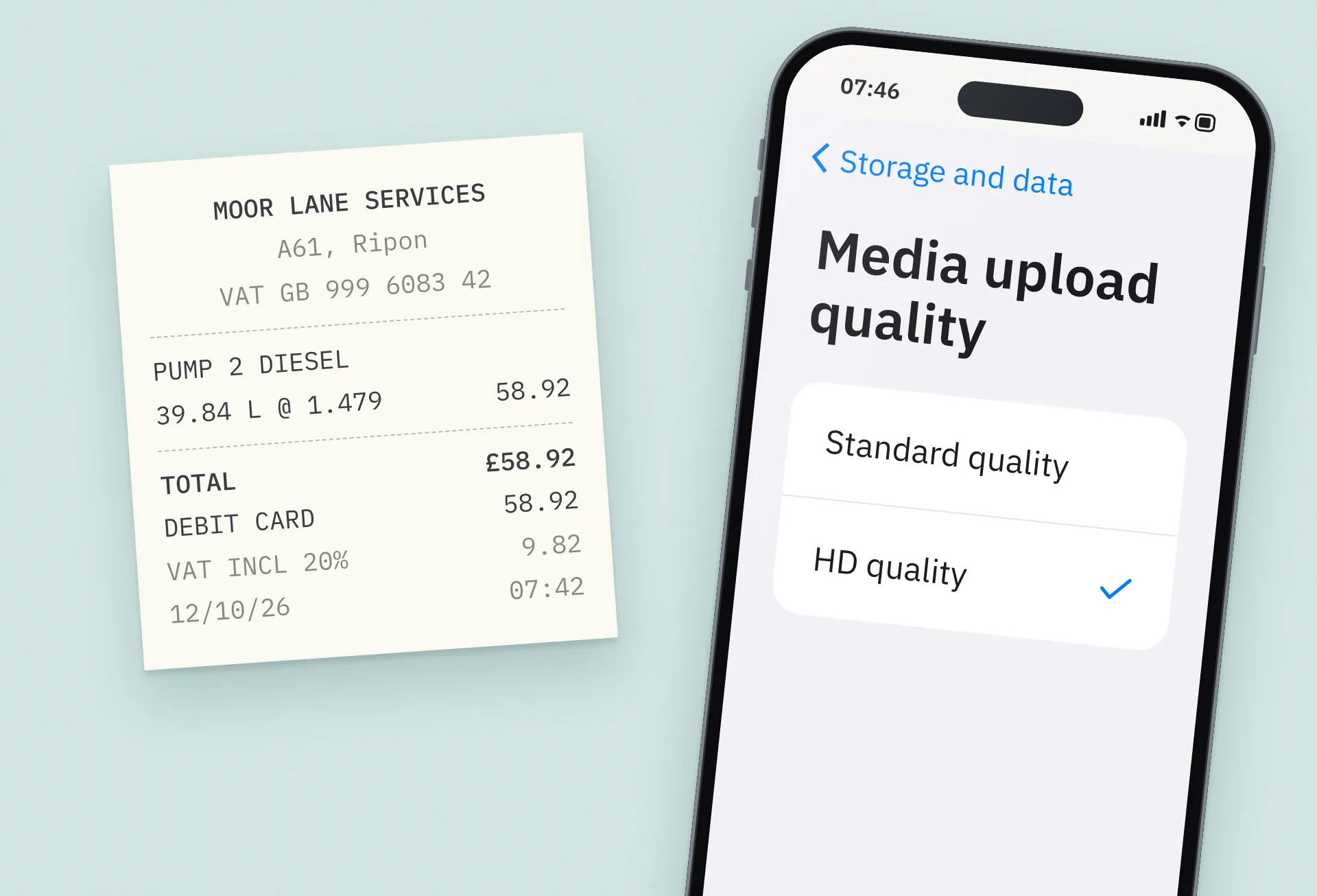
Each photo goes as Standard quality or HD quality. One already sent cannot be made sharper: it has to be sent again in HD. Even in HD, WhatsApp says the connection affects the quality of what arrives.2
So when a receipt comes in, zoom in on the smallest print before you reply: the supplier’s VAT number, the VAT lines and the date. If you cannot read them, ask for the photo again while the client still has the paper.
WhatsApp settings for sending receipts
What to ask of clients who send their receipts on WhatsApp:
- HD quality
- Before sending a photo, tap the HD icon and choose HD quality.2
- HD as the default
- In WhatsApp’s Settings, Storage and data, then Media upload quality: choose HD quality. Photos then go in HD unless Standard is chosen for one.2
- Not view once
- A view once photo disappears from the chat once it has been opened, and cannot be saved, forwarded or copied.3
- Disappearing messages off
- With disappearing messages on, messages go 24 hours, 7 days or 90 days after they are sent, and photos in the chat are not saved to the phone. In a chat between two people, either of them can turn it off.4
- PDFs as documents
- A supplier’s PDF invoice can be sent as it is, as a document, instead of as a screenshot.1
Saving WhatsApp receipts out of the chat
Save each receipt out of the chat, with the client’s other records, as it arrives:
- WhatsApp Web
- Click the photo, then the download icon.1
- WhatsApp on Windows
- Right-click the photo and choose Save As.1
- iPhone
- Settings, Chats, then Save to Camera Roll saves incoming photos to the phone. It can also be set for one chat.1
- Android
- A photo you download is saved to the phone’s gallery: Media visibility is on unless it has been turned off, for every chat or for one.1
Records for VAT are kept for at least 6 years,5 and a sole trader’s for at least 5 years after the 31 January deadline of the tax year they belong to.6
Is a photo of a receipt enough for HMRC?
HMRC’s record keeping notice gives two examples. Where only some figures from an invoice are typed into software, the invoice must still be kept in its original form, as the figures are not a copy of it. Where software scans the invoice and the image is kept and contains all the detail required for VAT, the original does not need to be kept, unless it is needed for another purpose.7
For a simplified VAT invoice, which a business can give for a supply of £250 or less, that detail is the supplier’s name, address and VAT registration number, the time of supply, a description of what was bought, and for each VAT rate the total including VAT and the rate.8
So a photo has to show each of them sharply enough to read. One that cuts off the shop’s name or blurs the total or the VAT rate does not.
A receipt request email for your clients
Send it at the start of each month, or once when a client starts, and fill in the parts in brackets. It asks for HD photos on WhatsApp.
Subject: Receipts for [October]
Hi [name], Could you send me your business receipts and purchase invoices for [October] by [Friday 6 November]? Please send: - every receipt and supplier invoice, on paper or by email - the whole receipt, top to bottom: the till receipt that lists what you bought, not only the card slip - every page of each invoice For a photo, lay the receipt flat in good light, with all four corners in the picture. Where to send them: [your upload link or email address] If you use WhatsApp, tap the HD icon and choose HD quality before you send, and please don’t send receipts as view once: I can’t save those. Thank you, [your name]
When a photo comes in that you cannot read, a short reply on WhatsApp is enough:
Thanks [name]. I can’t read [the VAT number] on this one. Could you send it again in HD? Before you send, tap the HD icon and choose HD quality.
If your clients use Daybook, the line on where to send them is their own Daybook address, which they see on their documents page, or the upload page at app.daybookcapture.co.uk in their web browser, where they sign in with a code we email them.
WhatsApp receipts in Daybook
Save the photos from the chat, then drop them on Daybook’s upload page together and choose the client. Each is read like any other upload: the supplier, the date, the VAT by rate and every line, with anything that cannot be read left empty and marked, never guessed.
Clients can also leave WhatsApp out. They can upload from the web browser on their phone, where a photo taken on the upload page goes straight to Daybook, or forward receipts to their own Daybook address. There is nothing to install (how clients send receipts).
When the same receipt comes twice, as a photo on WhatsApp on Monday and by email on Friday, the later copy is marked as a possible duplicate: the same supplier and total, and the same date or number.
Doing this for clients every month? Try Daybook on one client’s month: free for 14 days, no card needed.
Questions
How do I get receipts from clients every month?
Ask on the same day each month, give a date to send them by, and say where to send them, as the receipt request email above does. There are more to copy, for a VAT quarter, missing bank statements and the year end, in the emails to request receipts. Daybook can also send the monthly request in your firm’s name, with the client’s own Daybook address to send them to.
Can clients send receipts to Daybook from WhatsApp?
Not straight from WhatsApp. They save the photo, then upload it in their web browser or email it to their Daybook address. A photo taken on Daybook’s upload page goes straight to Daybook instead.
Do clients have to keep paper receipts once they have sent a photo?
In HMRC’s record keeping notice, a business whose software scans its invoices need not keep the originals when the image is kept and contains all the detail required for VAT, unless they are needed for another purpose.7 So check the photo first: until then, the paper is the only way to get a better one.
What if a client sends a receipt as view once?
It cannot be saved, forwarded or copied, and it disappears from the chat once opened.3 Ask for it again as an ordinary photo, in HD.
Read next
- Emails to request receipts from clientsEach month, after a VAT quarter, missing bank statements and the year end, with a reminder.
- Photographing a long receiptIn overlapping parts from the top down, as pages of one PDF, read as one receipt.
- Faded till receiptsPhotographing them the day they arrive, a faint receipt, and one that has already faded.
- How clients send receipts inThe same job in Daybook Capture, for every client.
Sources
Every fact on this page was checked against these on 27 October 2026.
- How to send media, contacts, or location (opens in a new tab), WhatsApp Help Center.
- About HD photos and videos (opens in a new tab), WhatsApp Help Center.
- About view once (opens in a new tab), WhatsApp Help Center.
- About disappearing messages (opens in a new tab), WhatsApp Help Center.
- Record keeping (VAT Notice 700/21), paragraph 2.4: keeping records (opens in a new tab), HMRC, updated 18 March 2024.
- Business records if you’re self-employed: how long to keep your records (opens in a new tab), GOV.UK.
- Record keeping (VAT Notice 700/21), section 6: keeping digital and original records (opens in a new tab), HMRC, updated 18 March 2024.
- VAT Notice 700, paragraph 16.6.1: simplified VAT invoices (opens in a new tab), HMRC, updated 25 June 2026.