
Photographing a long receipt.
One photo of a long receipt shrinks the print until the VAT number and the VAT summary blur. Here is how to photograph or scan a long receipt with your phone in overlapping parts, and keep it as one document.
Last updated
In short
- One photo of a long receipt blurs the small print; HMRC accepts an image only with all the detail required for VAT.
- Photograph it in parts from the top down, each keeping a line or two of the last.
- Notes on an iPhone and Google Drive on Android scan the parts as pages of one PDF.
- Upload the parts as one document, not one receipt each.
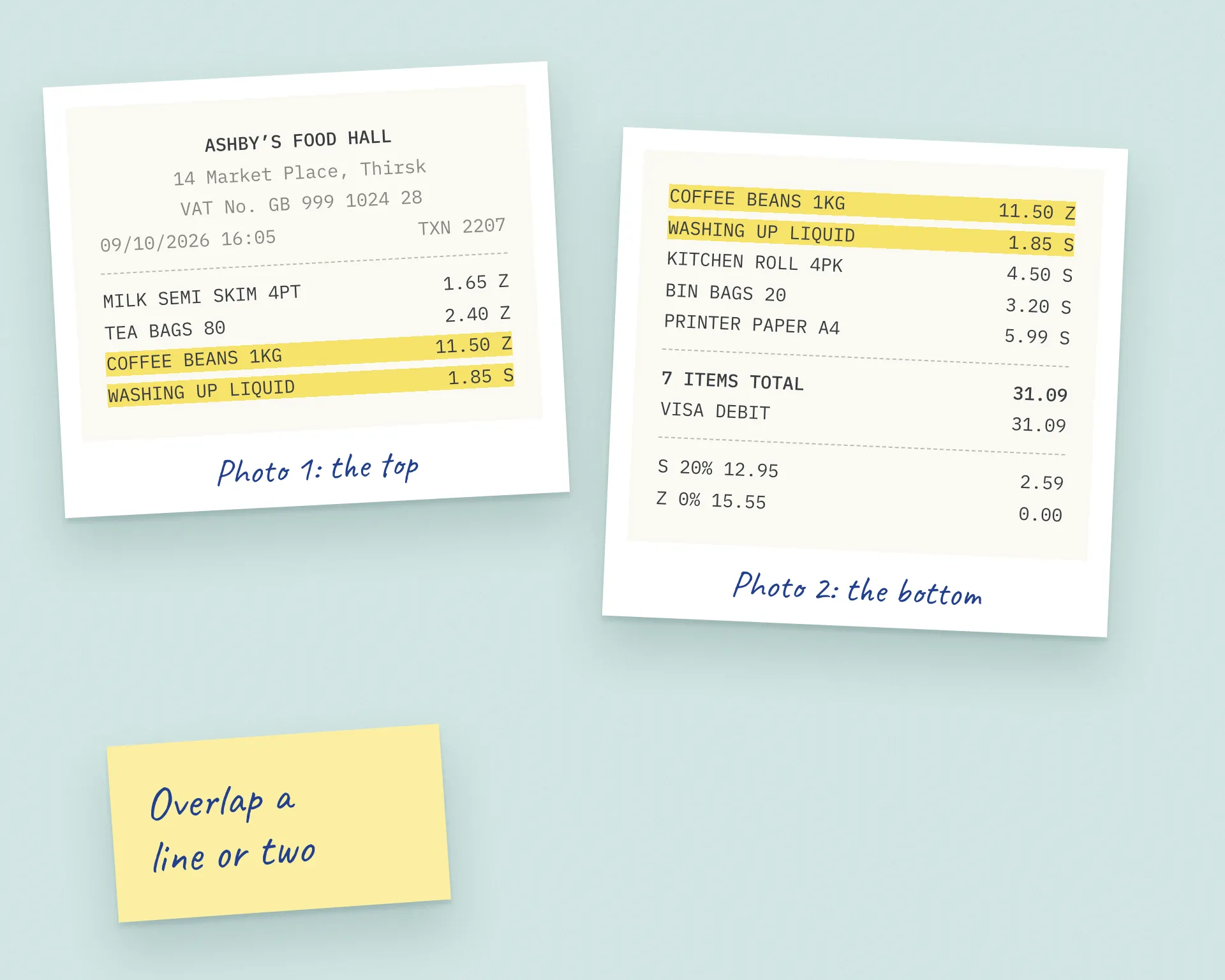
On Daybook’s upload page, a long receipt photographed in parts is joined into one document and read as one receipt. How clients send receipts in
Contents
Why one photo of a long receipt is not enough
To fit a long receipt in one photo, the phone has to stand back, and the print shrinks until the small lines blur. Those are the ones that matter: the shop’s VAT number at the top, and the VAT summary at the bottom.
HMRC accepts a kept image in place of the paper when it contains all the detail required for VAT.1 On a simplified VAT invoice that is the supplier’s name, address and VAT number, the date, what was bought, and for each VAT rate the total and the rate.2 A photo that blurs any of them does not do.
Photographing a long receipt in parts
- Lay the receipt flat on a plain, dark surface, in good light with no shadow.
- Start at the top: the shop’s name, address, VAT number and the date in the first photo.
- Move down and take the next photo, keeping a line or two of the last one in it, so no line falls between two photos.
- Finish with the bottom: the total, how it was paid and the VAT summary, whole, in the last photo.
- Keep the phone the same distance away each time, straight above the receipt.
Scanning a long receipt with an iPhone or Android phone
A phone’s scanner joins the parts for you. On an iPhone, Notes’ Scan Documents scans additional pages one after the other and saves them as one PDF in the note.3 On Android, Google Drive’s scanner adds a page with Add, and saves the document as a PDF or JPG.4
Scan the receipt from the top down, each part a page, with the same overlap as above. Both crop each page to the edges they find, so check every page takes in the whole width of the receipt.
Long receipts in Daybook
On Daybook’s upload page, Join its photos into one document takes the parts as the pages of one document: photograph them one after the other with Take the next page, or choose them together and they are put in name order. Each can be removed before they are joined into one PDF, up to 20 pages, and read as one receipt.
A PDF from the phone’s scanner can be uploaded as it is. In our test, a long receipt photographed in two overlapping parts was read as one document, with every field right.
Without joining, each photo would be read as a receipt of its own. More on what clients can send: client uploads.
Doing this for clients every month? Try Daybook on one client’s month: free for 14 days, no card needed.
Questions
How do I scan a really long receipt?
Can I keep a photo of a long receipt instead of the paper?
HMRC accepts a kept image that contains all the detail required for VAT,1 so every part has to be readable, the VAT number and the VAT summary included.
Should I upload each part as its own receipt?
No: each would be read as a separate purchase. Join them into one document, or upload the scanner’s PDF.
Read next
- Several receipts in one scanLaying out a pile of receipts for one scan, and one purchase for each.
- Faded till receiptsPhotographing them the day they arrive, a faint receipt, and one that has already faded.
- Receipts from clients on WhatsAppSharp photos, saved out of the chat, and a receipt request email to copy.
- How clients send receipts inThe same job in Daybook Capture, for every client.
Sources
Every fact on this page was checked against these on 27 October 2026.
- Record keeping (VAT Notice 700/21), section 6: keeping digital and original records (opens in a new tab), HMRC, updated 18 March 2024.
- VAT Notice 700, paragraph 16.6.1: simplified VAT invoices (opens in a new tab), HMRC, updated 25 June 2026.
- Scan text and documents in Notes using the iPhone camera (opens in a new tab), Apple, iPhone User Guide.
- Scan documents with Google Drive, Android phone and tablet (opens in a new tab), Google Drive Help.