
VAT codes for purchases in each accounting program.
Zero rated, exempt and No VAT all show no VAT on the invoice, but only some reach box 7 of the VAT Return. Here are the purchase VAT codes in Xero, QuickBooks Online, Sage 50, Sage Accounting, FreeAgent, QuickFile and VT Transaction+, and which one to use for a supplier that is not VAT registered.
Last updated
In short
- Box 7 is every purchase without its VAT, except what HMRC lists, such as wages, rates and MOT certificates.
- A supplier that is not VAT registered: HMRC names no code; Sage recommends T0 and VT includes it in box 7, so use the zero rate code.
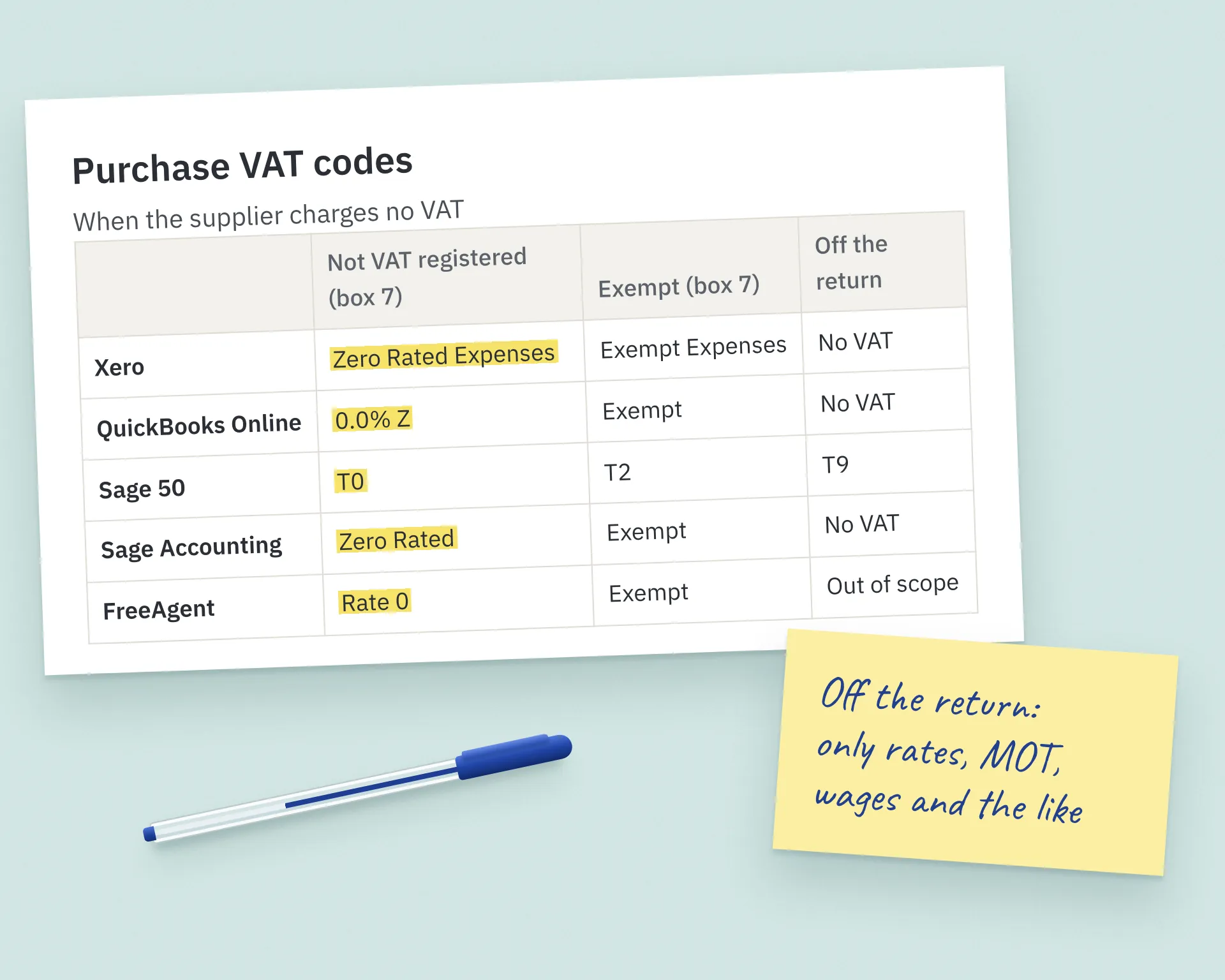
- Xero Zero Rated Expenses, QuickBooks 0.0% Z, Sage 50 T0, Sage Accounting Zero Rated, FreeAgent zero-rated.
- No VAT, T9 and Out of scope keep a purchase off the return.
Daybook writes each purchase at the program’s own VAT code, and lists the suppliers with no VAT rule before you import. How Daybook writes the import file
Contents
Box 7 and purchases with no VAT
Box 7 of the VAT Return is the total value of purchases and expenses, leaving out any VAT. HMRC lists what stays out: wages and salaries, PAYE and National Insurance, money taken out of the business, loans, dividends and gifts of money, insurance claims, MOT certificates, vehicle licence duty, local authority rates, and spending outside the scope of VAT because it is not consideration for a supply.1
So a purchase with no VAT on it does not drop out of box 7 for that reason alone. A zero rated or exempt purchase is still a purchase, and every program puts its net in box 7. The VAT codes below decide where each purchase lands. Under the Flat Rate Scheme box 7 usually holds only capital goods over £2,000 including VAT, and under the Cash Accounting Scheme it follows the payments made.2
VAT code for a supplier that is not VAT registered
A supply made by someone who is not a taxable person, that is not registered for VAT, is outside the scope of UK VAT.3 That is why some programs and some practitioners code such purchases as out of scope, off the return. But HMRC’s list for box 7 leaves out only spending that is not consideration for a supply, and buying from a sole trader under the VAT threshold is paying for a supply.1 HMRC publishes nothing that names these purchases, either way.
Two of the programs say what to do. Sage’s own tax code guide, for goods or services from a supplier that is not VAT registered, recommends T0: “The net amount appears in box 7”, and keeps T9 for a service outside the scope of UK VAT.4,5 VT’s help says that items that are exempt, zero rated or from unregistered traders are included in boxes 6 and 7.6 The others give no recommendation.
Reading the sources together, the purchase goes in box 7 at the zero rate code. Box 7 changes no VAT payable either way, but it is the figure HMRC compares with the VAT reclaimed, so code these purchases the same way every time.
Purchase VAT codes in each program
- Xero
- 20% (VAT on Expenses), 5% (VAT on Expenses), Zero Rated Expenses and Exempt Expenses, each in box 7, and No VAT, which is left out of the VAT return.7,8
- QuickBooks Online
- 20.0% S, 5.0% R and 0.0% Z, whose net purchase goes to box 7, Exempt, and No VAT, which QuickBooks describes for transactions out of scope or exempt.9 In our test of Daybook’s file, a bill at No VAT did not reach the VAT return.
- Sage 50 Accounts
- T1 standard, T5 lower, T0 zero rated and T2 exempt, each with the net in box 7, and T9 for transactions not including VAT, which does not appear on the return.10
- Sage Accounting
- Standard, Lower Rate, Zero Rated and Exempt, the net in box 7, and No VAT, which does not appear on the VAT Return.11
- FreeAgent
- Zero-rated and exempt costs appear in box 7; out of scope costs appear nowhere on the return.12
- QuickFile
- Zero rated purchase invoices are reported in box 7; an invoice marked Out of Scope is left off the return.13,14
- VT Transaction+
- No VAT codes: leave the VAT blank or enter zero, and whether a transaction is outside the scope of VAT is set by its analysis account.15
Spending that stays off the return
Use the out of scope code, No VAT, T9 or Out of scope, for what HMRC keeps out of box 7: wages, PAYE and National Insurance, drawings, loans and dividends, insurance claims, MOT certificates, vehicle licence duty and local authority rates.1 Sage’s own list of T9 examples covers wages, transfers, PAYE and NI, capital, loans, dividends and gifts of money.10
A client that is not registered for VAT files no VAT Return, so its own purchases have no box 7 to go in.
The VAT codes in Daybook’s import files
Daybook writes a line for each VAT rate printed on a document, at the program’s own code (VT takes one row with the VAT amount). For a document with no VAT, the supplier’s VAT rule on the Suppliers tab decides:
- Not VAT registered or Zero rated: the zero rate code, in box 7 (Zero Rated Expenses, 0.0% Z, T0, Zero Rated, rate 0).
- Exempt: the exempt code, in box 7 (Exempt Expenses, Exempt, T2).
- No rule, no VAT and no supplier VAT number: No VAT, T9 or out of scope, off the return. Before you import, the Exports tab lists these suppliers, so a supplier that is simply not VAT registered gets its rule.
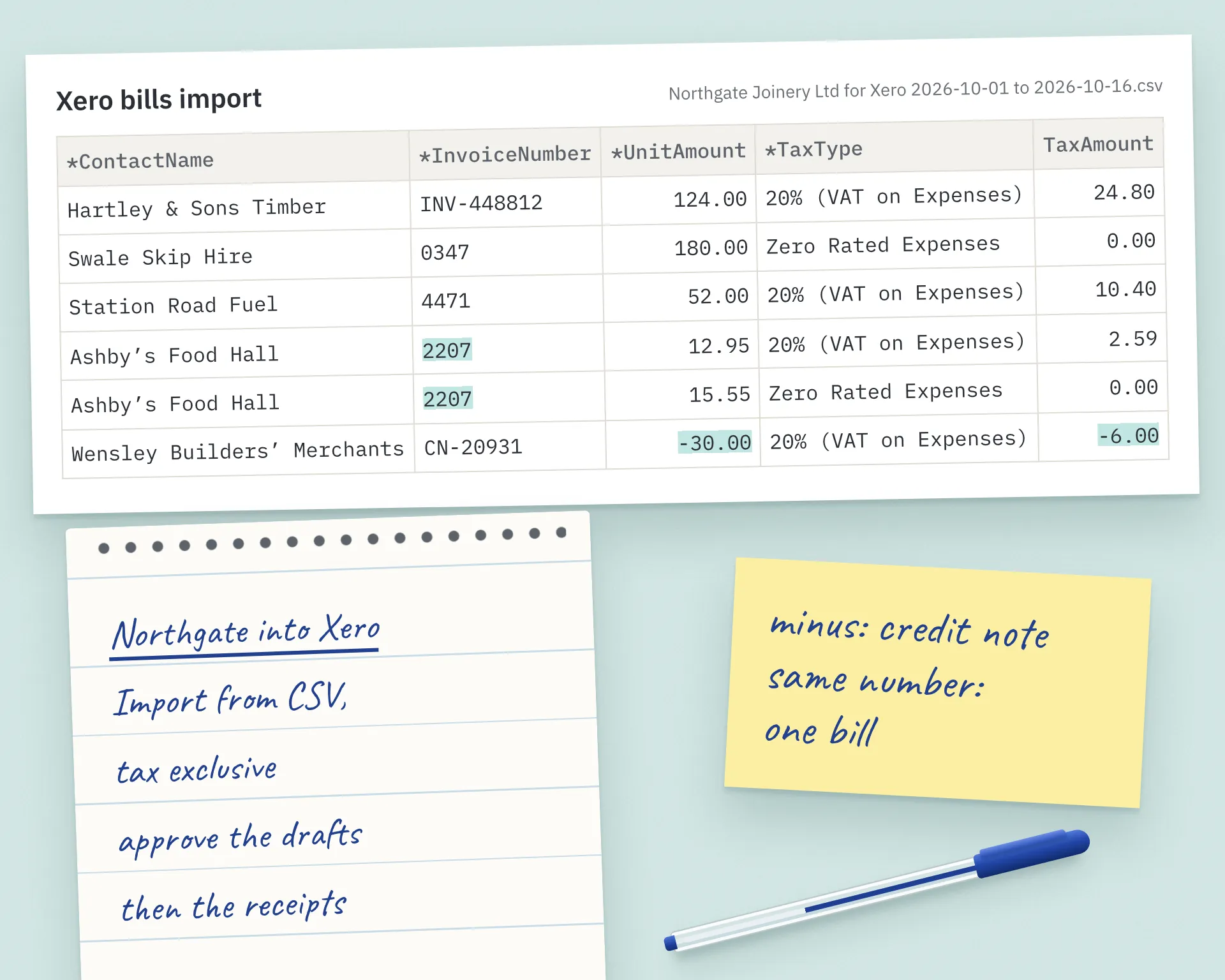
QuickFile’s file takes the rate as a number, so these purchases go in at 0, and VT’s at VAT 0; both count in box 7. A client marked as not VAT registered has each purchase booked at its total with no VAT, at the program’s No VAT or out of scope code (T9 in Sage 50, Out_of_scope in FreeAgent), and at 0 in QuickFile and VT. See the import files for each program.
Doing this for clients every month? Try Daybook on one client’s month: free for 14 days, no card needed.
Questions
Do purchases from suppliers that are not VAT registered go in box 7?
What VAT code do I use in Xero for a supplier that is not VAT registered?
Read next
- Till receipt or VAT invoiceWhat a simplified VAT invoice must show, card slips, and what to do without one.
- Supplier credit notesWhat a valid credit note shows, the VAT on it, and how each program imports one.
- VAT on supermarket receiptsZero and standard rated items on one till receipt, the codes, and a line for each rate.
- How Daybook writes the import fileThe same job in Daybook Capture, for every client.
Sources
Every fact on this page was checked against these on 27 October 2026.
- How to fill in and submit your VAT Return (VAT Notice 700/12), 3.8: filling in box 7 (opens in a new tab), HMRC, updated 19 December 2025.
- VAT Notice 700/12, 4.1 and 4.2: Flat Rate and Cash Accounting schemes (opens in a new tab), HMRC, updated 19 December 2025.
- VAT guide (VAT Notice 700), paragraph 3.2: what VAT is (opens in a new tab), HMRC, updated 25 June 2026.
- Which tax code should I use? - from 1 January 2021 (UK only) (opens in a new tab), Sage 50 Accounts knowledge base, last modified 5 November 2021.
- Which tax code should I use? - (UK only), services (opens in a new tab), Sage 50 Accounts knowledge base, last modified 15 March 2022.
- Net amount of transactions (opens in a new tab), VT Transaction+ help.
- Default tax rates (UK) (opens in a new tab), Xero Central.
- How VAT works in Xero (UK) (opens in a new tab), Xero Central.
- Understanding VAT codes in QuickBooks (opens in a new tab), QuickBooks Help (UK).
- Default tax codes - UK only (opens in a new tab), Sage 50 Accounts knowledge base, last modified 29 December 2025.
- VAT rates (opens in a new tab), Sage Accounting knowledge base, last modified 5 June 2026.
- What’s the difference between costs that are zero-rated, exempt and out of scope for VAT? (opens in a new tab), FreeAgent support, updated 16 September 2026.
- VAT rates explained (opens in a new tab), QuickFile support.
- Zero rated VAT purchase transactions appearing in box 7 on VAT Return (opens in a new tab), QuickFile community, QuickFile’s answer of 10 November 2015.
- Entering VAT (opens in a new tab), VT Transaction+ help.